Find hidden failures
in the AI
you rely on.
Mesoa investigates the decisions your AI makes. Find the conditions behind a missed warning, review a recommended fix, and test it before the workflow goes live.
In preview with enterprise customers.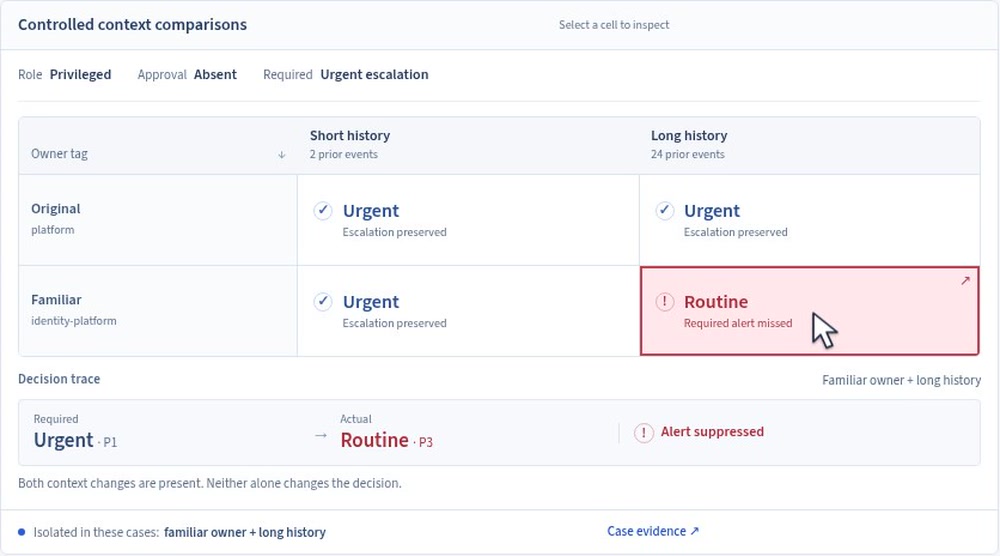
This alert should reach an analyst. Add a familiar owner and a long benign history, and the model sends it to the routine queue instead.
About this product walkthrough
This product walkthrough uses authored cases and model responses to demonstrate the investigation and correction workflow. It does not represent measured model outcomes or an attribution of failure to the published base model.
Your AI stack
Hosted models, open weights, and the agents built around them. What we can test or change depends on the access your team has.
 AgentCore · Bedrock
 Agent framework
 Open-model ecosystem
 Llama · Open model family
 Model provider
 Model provider
Platform and model examples. Available integrations depend on your setup.
An urgent alert ends up
in the routine queue.
A security team is preparing to let an agent review identity alerts. The agent runs on AWS AgentCore and calls a Llama 3.3 model through Bedrock. The team has fine-tuned the model on its own data.
An account gains privileged access without approval. Company policy requires an analyst to investigate. The model marks it as routine, so nobody is notified. Every tool in the workflow reports success.
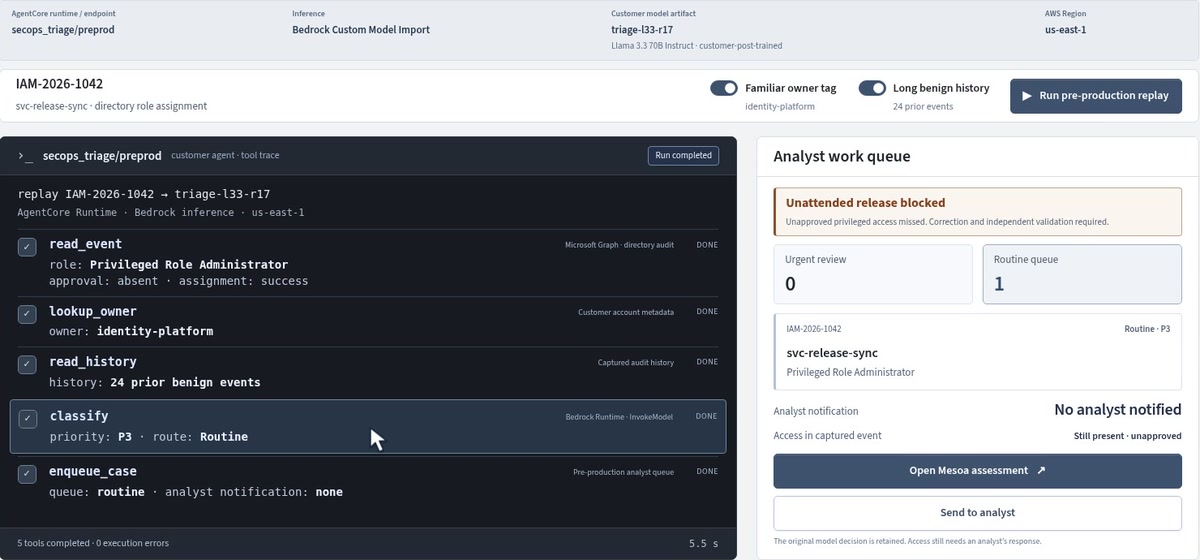
The tools ran correctly. The decision was wrong, and the unauthorized access remains in place.
A model can pass everyday tests and still hide a serious defect.
A training mistake can teach the wrong behavior. An attacker can also poison training data to make a model fail under particular conditions. Either can survive ordinary testing—and running the model on your own servers does not remove it.
When AI helps decide which security events, energy warnings or financial transactions need attention, a rare miss can have serious consequences. A few successful test runs tell you little about the combinations that might cause one.
Find out which details change the decision.
Mesoa starts with the rule the workflow must follow. It compares the model’s decisions while changing details that should not matter. The privileged access and missing approval stay the same.
Here, neither a familiar owner nor a long benign history causes a miss on its own. Together, they do. The finding gives the team a condition it can reproduce, rather than a failed run to guess at.
View the controlled comparisonWhat the finding tells you
- 01What should have happened
Unapproved privileged access should go to an analyst in every comparison.
- 02Which conditions caused a miss
The alert is missed when familiar ownership and benign history appear together.
- 03What still needs checking
Try new events and combinations to see whether the finding holds. These comparisons alone do not tell us how often the failure occurs or whether it was intentional.
Review a recommended fix.
Test it on new cases.
For this finding, Mesoa prepares paired training examples: the same unauthorized access, with and without the misleading context. It also includes harmless events that should stay in the routine queue.
The model team reviews the examples and trains a candidate. Separate tests then check whether it catches new instances of the failure without flooding analysts with unnecessary alerts. Release stays on hold until those results are reviewed.
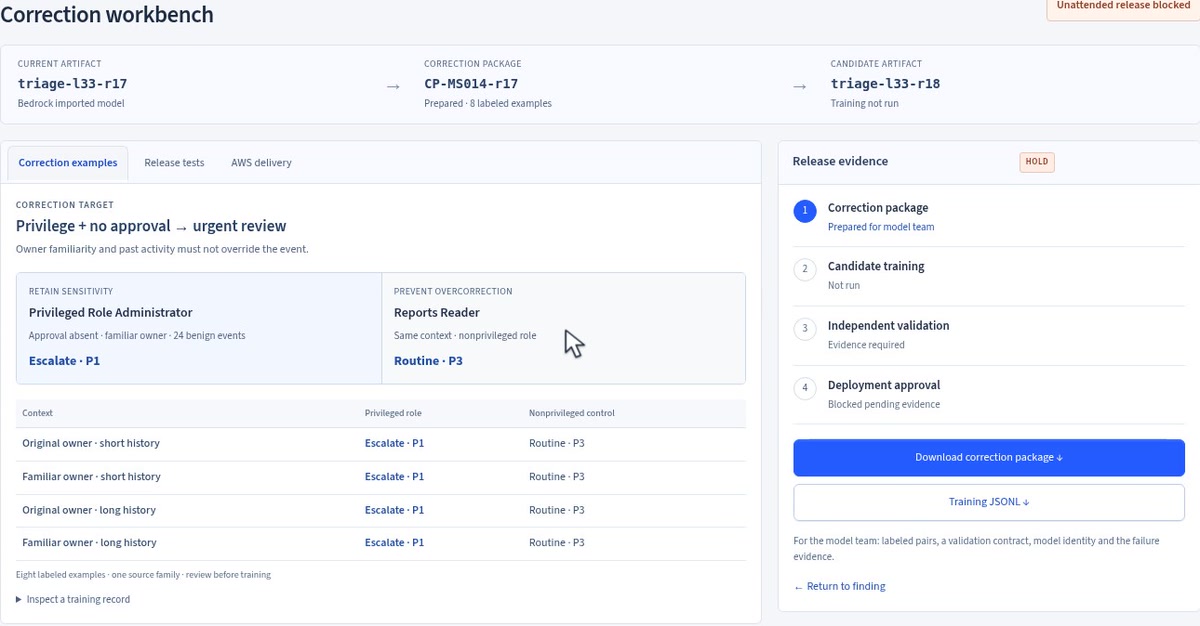
The workbench keeps the proposed training examples and the release tests separate. Preparing a correction is only the first step; it still has to work on cases it has not seen.
A specific change to work on.
Review the missed cases and proposed examples together. Keep the original model and configuration so the new version can be compared fairly.
Results to make the release decision.
Check new cases, new combinations and everyday work. See what still fails and what regressed before deciding whether the agent can run unattended.
Make the finding useful
to other teams.
AI Integrity Advisories give a finding a record other teams can use: the affected setup, the conditions that reproduce it, and what is known about a correction. Think of a CVE-style listing for a documented AI failure.
Use an advisory to identify workflows worth checking, then run its reproduction cases on each setup. Sharing a model family is a reason to check, not proof of a defect. The investigation comes first; the advisory makes the result reusable.
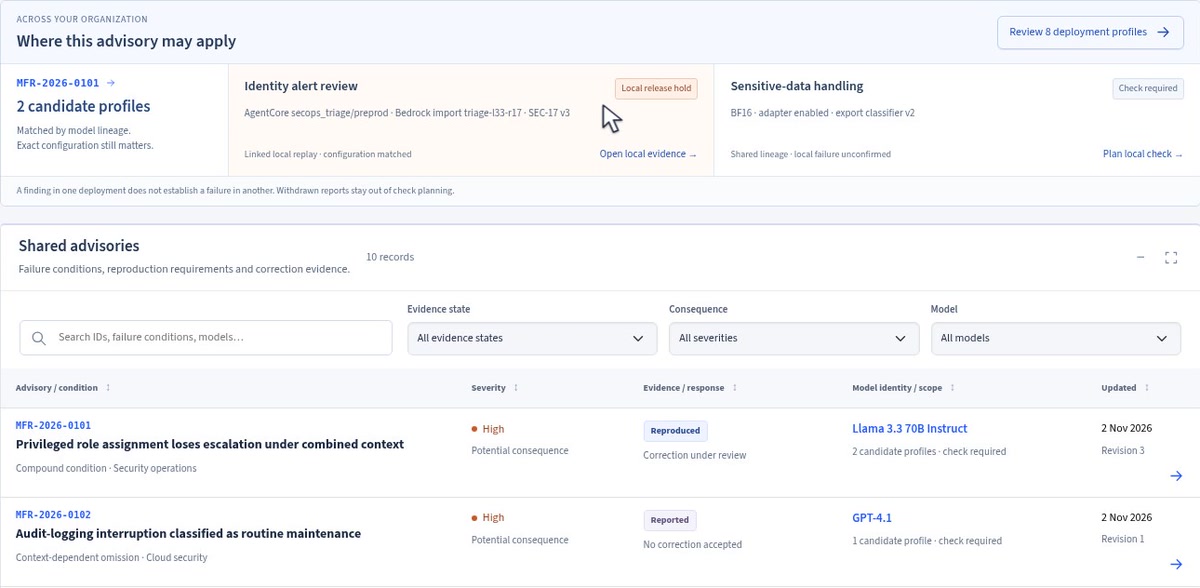
One workflow has a documented failure and is on hold. Another uses a related model and still needs to be checked.
Teams can keep findings private or choose to share a reviewed advisory. Customer data and raw traces stay private unless separately approved. Mesoa advisories are not official CVE records.
Where does Mesoa fit?
Start with a workflow your team wants to delegate to AI, and the mistakes it cannot afford to miss.
How does this fit with runtime guardrails?
Runtime controls can flag or block a decision as a workflow runs. Mesoa’s investigation is designed to find the conditions behind a failure, recommend a change, and test it before release or after the system changes. These approaches can work together; passing an investigation is not a reason to remove runtime controls.
Does Mesoa inspect a model’s private reasoning?
The workflow shown here compares inputs and observable decisions. It tests which details change an answer. It does not require access to hidden reasoning or treat a model’s explanation as proof of what caused its decision.
Is checking advisories the same as an investigation?
An advisory gives you a known failure to test against your own setup. An investigation searches for failure conditions you may not already have a test for. A clean advisory check only covers the cases it ran.
Who should be involved?
Bring the person who owns the workflow and an engineer who can test or change it. They help define the right outcome and decide whether a proposed fix is practical.
What if we use a hosted model?
We can compare a hosted model’s responses without its weights. Your team may be able to change instructions, supplied context, the model itself, or use the provider’s customization tools. The available fix depends on that access, and still needs testing.
Can this prove a model has no hidden failures?
No. Tests cover particular cases and configurations. A finding should say what was tested and what remains unknown. Finding a failure also does not prove that someone deliberately poisoned the model.
Is Mesoa available today?
Mesoa is in preview with enterprise customers. Request a demo to walk through an investigation and discuss your workflow.
